
This article will guide you through the process of editing a revenue model.
Getting started
From the Vision Home page
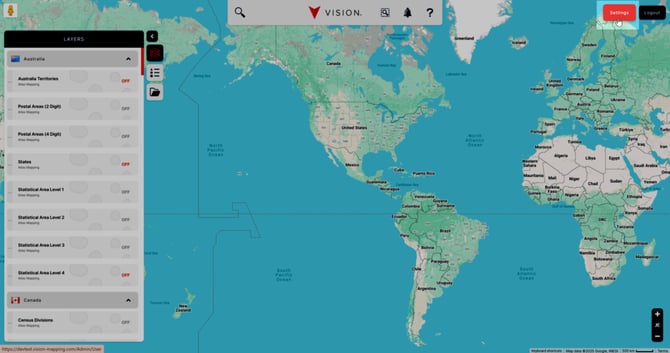
Click the Settings in the top right of your page.
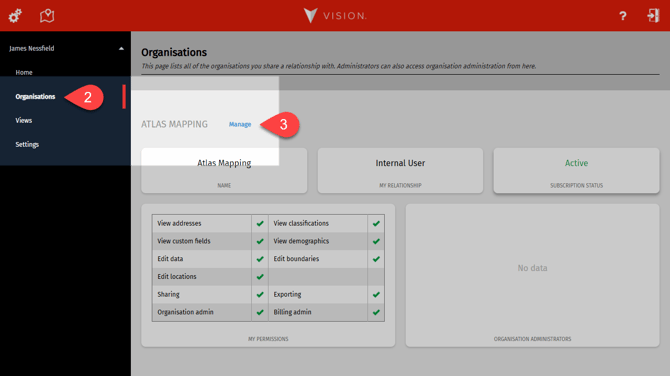
- Select the Organisations tab on the left-hand side.
- Click the blue Manage button next to your Organisation name.
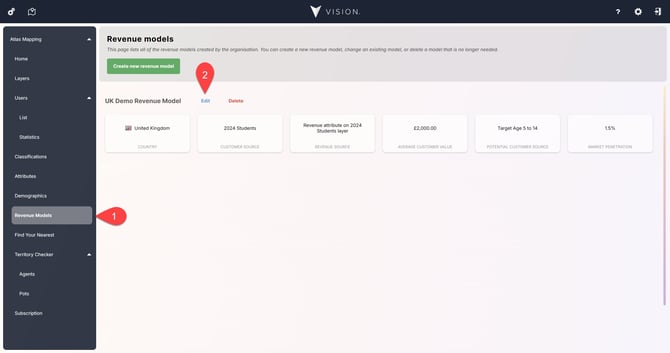
- Select Revenue Models from the navigation menu, and then
- Click Edit next to the revenue model you'd like to amend.
The window follows the same progress as Create a revenue model.
Customer Data
Here you can amend the customer data source. It can be a location layer of the data, a demographic attribute, or make the data source none.
Revenue Data
Here you can change the revenue data source. It can be a customer attribute on the location layer chosen previously, a demographic attribute, or none.
Additional Settings
Amend the revenue model's potential customers data source, the average customer value, and the market penetration.
Select the Save and close button to finalise any changes.